Showing posts with label Reviews. Show all posts

REVIEW: Weather Underground Local Weather Website

The iPhoneWriter.com team landed on a great resource recently, for local weather conditions, forecasts, alerts and notifications, etc. Overall, makes other weather related websites look pretty week.

The website, Weather Underground provides forecasts that are generated from a proprietary forecasting system that leverages their vast amount of neighborhood weather data. The call the system "Best Forecast" and it really is awesome. Plus, Weather Underground is fully compatible with mobile and non-mobile devices… so, whether your on your iPhone or your Macbook, Weather Underground provides accurate and complete weather information.

Weather Underground's ever-expanding network of 22,000+ personal weather stations is the largest of its kind and provides a unique ability to provide the most local forecasts based on actual weather data points. Their BestForecast™ uses the most innovative forecast models available and cross-verifies their output with all of the localized data points. Only our unrivalled amount of local neighborhood weather data can generate forecasts for your front door.

Best of all, isn't just for the United States. Weather Underground is worldwide and provides current International weather conditions that are collected directly from more than 29,000 weather stations located in countries around the globe.

It's easy to see why Weather Underground is rapidly emerging as the premier weather information location on the Internet. But don't take the iPhoneWriter.com team's word for it, click over to the Weather Underground website and give them a spin for yourself. You won't be disappointed!

REVIEW: Dropbox Cloud Storage Service

The iPhoneWriter.com team was recently in the age old predicament of needing to transfer data between two locations. So, we took Dropbox for a spin and we liked what we found.

For those that aren't already familiar with Dropbox, they provide a free service that lets users store their photos, docs, videos, etc. Once stored (uploaded/saved) to your Dropbox, files can be easily accessed from virtually any computers or smartphone, as well as the Dropbox website. Another great feature about Dropbox, which is why the iPhoneWriter.com team decided to give the service a try, is that Dropbox makes it easy to share files with other people. Plus, in the event of an unexpected computer catastrophe, having files stored with Dropbox is a great way to ensure they are backup up.

All things considered, the iPhoneWriter.com team found the Dropbox service to be worth every penny… after all, you get 2GB for free and more space is available for fairly reasonable monthly rates.

REVIEW: inDense Weather for iOS

Described as "simple, sleek, easy to use and accurate", the InDense Weather application for iOS is a new favorite of the iPhoneWriter.com team. Plus, the app is free!

The InDense Weather application for iOS works by using the the GPS information of your iOS device to provide real-time hyperlocal weather information. The app also provides altitude information and provides the ability to quickly calculate the Density Altitude, which is especially useful for anyone who cares about that kind of stuff (pilots and race car drivers are mentioned in the app's description.)

Testing revealed that InDense Weather application for iOS is a great app for anyone that wants to know the current weather conditions, including the temperature and heat index, the humidity and dew point, wind speed and direction, wind gusts and barometric pressure, visibility, clouds, and the UV index. But wait, there's a a lot more, including weather radar, with regional and local information, the extended weather forecast, severe weather warnings and more.

The iPhoneWriter.com team likes this application so much, we've replaced the default weather app on our iOS device's home page with this app. Check it out, you might just do the same.

REVIEWS: Props To AGMan35

Let's face it, one of the key ingredients to today's Internet is the video review. You know what we mean, the latest videos showing how this product is unboxed, or how that product works, or how yet another product looks and feels. Next to How-To's, the iPhoneWriter.com team loves Review videos above all else and, If you're anything like us, you love them too. Well get ready to fall in love again, this time with a guy named AGMan35, as he's known on YouTube.

AGMan35 has an ever-growing collection of videos focused on technology reviews and how-to's but that's not what's cool. What's cool, really cool, is the fact that he doesn't just focus on new-school gadgets and technology, he also devices a fair amount of his time to the old-school stuff. Ever seen an unboxing video for the Apple QuickTake 200 digital camera? How about a review of the original Macintosh SE? AGMan35 recently posted videos on both topics… right beside a great How-To for recalibrating the home button on an iPhone. The best of the old and the new, all in one place. Sweet!

So, after spending more time on his Geek Sanctuary than we expected, the iPhoneWriter.com team gives a huge thumbs-up and major props to AGMan35. We enjoyed his videos so much, we've updated our own video bar to only include his channel.

Be sure to check him out, you know you want to, and subscribe to his channel so that you're always in the know.

Review: iCHL for iPad, iPhone and iPod Touch


The iPhoneWriter.com team just completed a review of the iCHL for iPad, iPhone and iPod Touch application. In short, iCHL for iPad, iPhone and iPod Touch is ideal for anyone that has obtained a Concealed Handgun License (CHL, also known as a CCW or CPL license) or for any individual that has made the decision to own a firearm.

The App's Current Features Include:

Simple and easy to use navigation
- Fully functional in Landscape and Portrait modes
- Quick Reference Handgun & Rifle Charts for each State
- Reciprocity & Recognition information for each State
- Detailed Firearms Law and Constitutional Provisions for each State
- Integration with Google Maps for each State, provides information for: State Attorney Generals Office, Department of Public Safety / State Police, Handgun Certification and Permit Programs, Gun Shows, Events & Exhibits, and Firing Ranges & Shooter Clubs
- Related Links for Ammunition, Accessories, Books, Games and Videos
- The United States Declaration of Independence
- The Bill of Rights and the Second Amendment
- The Constitution of the United States
- Free Lifetime application updates with purchase

Specifically designed for the Apple iPad, iPhone and iPod Touch, iCHL is a fully functional application that provides current firearms laws and information for all fifty (50) United States and the District of Columbia. Every attempt is made to provide accurate and current information, however laws are subject to change so check back frequently for free updates and upgrades. We give it four stars, with a little bit of room to improve to get the full five.

Review: Apple iPhone 2G vs. HiPhone I32

Within weeks of launching the original Apple iPhone 2G, the clone makers got busy working to duplicate Apple's efforts. The result took time to hit the United States and even longer to become some worth reviewing or even comparing to the Apple iPhone. Enter the HiPhone I32, which the iPhoneWriter.com team purchased for the sole purpose of comparing with the Apple iPhone.

In form factor and appearance, the HiPhone I32 is almost identical to the Apple iPhone. Measuring in at 4.19" x 2" x .63" (112mm x 15mm x 57mm), the HiPhone is only slightly thicker than the Apple iPhone 2G. Where the HIPhone i32 sets itself a part is the included features, which are innumerable and surpass the Apple iPhone on many fronts, and in the ability to expand the storage by way of Micro SD cards. Here's some of the main distinguishing features the the HiPhone I32 provides.
  • GPRS Dual Sim Card Telephone
  • SMS, MMS Messaging
  • Integrated SVGA camera (1.3 megapixels)
  • Video player
  • Video recorder
  • Bluetooth 2.0; USB; WAP 2.0
  • Integrated hands free speaker
  • 3D Stereo surround sound
  • Voice record and playback
There's plenty of other cool features too. The HiPhone I32 also has a neat "shake" feature that allows switch between songs, in addition to decent sound when used with or without the included earphones. Also not unlike the Apple iPhone, the HiPhone I32's earphones have a built-in microphone and pause button that works pretty good too.

Where the HiPhone I32 falls short is the lack of integration with iTunes (which of course means no App Store), an inability to surf the Internet (a.k.a. the World Wide Web) and a user interface that can only be described as not-quite-Apple. Now, if what you need from a telephone is less than what the Apple iPhone provides, than the HiPhone I32 may be good enough for you. As far as mobile phones go, it's about as sleek as an Apple iPhone and has a shiny touchscreen (not optical glass like the Apple iPhone, btw) that works without a stylus, using just your fingers.

The HiPhone I32 is decidedly not the Apple iPhone though, not even close. Apple has nothing to worry about, other than the potential need for litigation over intellectual property. With that said, originating in China where even the knock-off's are cloned, the makers of the HiPhone I32 like have nothing to worry about either.

Review: Apple iPhone Real World Usage Battery Life Test Results

REPOST: The expected battery life for the Apple iPhone is the subject of many blog entries and reviews. Most of what you will read is negative or less than objective. However, since I use my Apple iPhone everyday for everything from my primary telephone to typing blog entries for the iPhoneWriter.com web site, I decided that a real-world battery life test was in order.

Usage patterns naturally vary, from day to day. Some days are busier than others, some days are not busy at all. To be as objective as possible, I decided that performing the real-world battery usage test three (3) times and then averaging the numbers to calculate the expected (estimated) real-world usage results. To ensure a valid final result, some basic rules were followed.

Rules of the Road, for the Apple iPhone Battery Life Test:
  1. The Apple iPhone must be used under real-world conditions, with no adjustment in usage patterns to artificially extend the life of a particular battery charge.
  2. The Apple iPhone battery must be fully exhausted before connecting to the charging cable for syncing or charging (since the Apple iPhone charges while syncing.)
  3. Once fully charged, the Apple iPhone cannot be re-charged or plugged into the computer until the battery is fully exhausted.
Before beginning the test, I followed the established rules and exhausted my Apple iPhone's battery. To ensure that the battery was completely drained, I listened to some music and surfed the web until the Apple iPhone shut down. At that point, I hooked up the Apple iPhone to the charger and went to bed confident that the real-world battery usage test was off to a good start.

Apple iPhone Battery Life Test: Round One
Having fully discharged my Apple iPhone before putting it on the charger the night before, Round One started with a fully charged Apple iPhone battery. I disconnected the Apple iPhone form the charging cable, checked my email and hit the road for work. During Round One, I used the Apple iPhone for a couple of phone calls, jamming to some music, checking my email and surfing the web. Otherwise, when not being used, the iPhone remained powered on and in stand-by mode. Right before the battery finally exhausted (within a few minutes of receiving the 5% Battery Life warning), the usage was:
  • Stand By: 1 Day 16 Hours
  • Usage: 5 Hours 8 Minutes
  • Combined Usage (Stand By + Usage): 1 Day 21 Hours 8 Minutes
Wow, not bad at all! Having owned a couple of other "smart" phones in the past, like the Treo and Sidekick, battery life like this blows me away and seems to support some of Apple's claims. Could this be a fluke? With the battery fully discharged, I connected the Apple iPhone to the charger and waited for Round Two.

Apple iPhone Battery Life Test: Round Two
With the results from Round One coming in at an outrageous 45 hours and 8 minutes, I was anxious to see if Round Two would yield similar results. Nearing the end of the battery charge, I made note of the usage. As it happened, I barely noted the times before the Apple iPhone shut down.
  • Stand By: 2 days 9 hours
  • Usage: 5 hours 3 minutes
  • Combined Usage (Stand By + Usage): 2 Days 14 Hours 3 Minutes
As you can see, the variation in times between Round One and Round Two is fairly significant. The difference does support the assumption that usage patterns would vary. Of course, that's why we are performing a three round test. I had slightly less usage and a bit more stand-by time this round.

Apple iPhone Battery Life Test: Round Three
After two rounds of testing, the bar was set pretty high for Round Three. When Round Three came to a close, while listening to one of our CD's from the 80's, the Apple iPhone did not disappoint, coming at just over two days combined usage.
  • Stand By: 1 Day 22 Hours
  • Usage: 4 Hours 52 Minutes
  • Combined Usage (Stand By + Usage): 2 Days 1 Hour 58 Minutes
Round Three ended with results that were consistent with Round One and Round Two. What makes Round Three note-worthy is that it included the use of the Aliph JawBone bluetooth headset (a review of the Aliph JawBone is forthcoming.) So, even while using a bluetooth headset, the Apple iPhone provided exceptional real-world battery life.

Apple iPhone Battery Life Test: What Is Real-World Battery Life
Put simply and for the purpose of this test, real-world battery life is defined as typical day-to-day usage of the Apple iPhone features and applications. While usage patterns varied from day-to-day, the range of applications and features used remained fairly consistent. During the testing, I used the Apple iPhone as an iPod, to listen to music and watch a movie; as a telephone, to check voice mail and make/take calls (visual voice mail rocks); to check e-mail (sending and receiving messages); to browse the Internet, participate in online forums and create content for the iPhoneWriter.com web site; as a mapping device to generate driving directions and locate a particular store; and much more, including things like checking the weather and snapping a couple of pictures.

Apple iPhone Battery Life Test: The Final Results
Averaging 50+ hours of combined usage over three separate rounds of testing, the real-world battery life for the Apple iPhone is exceptional and superior to any other smart phone we have used. During the testing, colleagues with other smart phones (like the Motorola Q, the BlackJack and a Treo) were amazed and envious of the battery life that the Apple iPhone provides. I can understand why, they are accustomed to charging their smart phones every night, with minimal usage during the day. As for the results of the iPhoneWriter.com real-world usage battery life test, the Apple iPhone passed with flying colors.

Review: eBay iPhone Application, Free Download in Apple's App Store

Available as a free download in Apple's App Store, the eBay iPhone application regularly appears in the App Store's Top 50 list. After using eBay's iPhone application for about two weeks and a few auctions, the iPhoneWriter.com team found that the eBay application is a good start with room to improve.

Using the eBay application really couldn't be easier. After installing the application and launching it for the first time, you simply tap the "Sign In" button and enter the login information for your eBay account. The application remembers your information until you tap the "Sign Out" button and there's also a link on the "Sign In" screen, for people who do not already have an account (we couldn't help but wonder how many people without an eBay account would actually download the application?)

Once logged in, a simple Home screen is presented, with options to view the standard auction information for your eBay account. The available options include auctions that the account is Watching, Winning, Won, Outbid, Scheduled, Selling, Sold and Unsold. Tapping an option on the Home screen takes you to a listing of those items, grouped based on being Active/In-Active, or Won/Didn't Win, Sold/Unsold, etc.

In addition to the Home screen, other options within the eBay application include "Search" and "My eBay". As you would expect, tapping the "Search" option brings up a simple search screen. A nice feature eBay included with "Search" is the ability to refine the search results. Tapping the "Refine" button presents options for sorting the results based on Best Match, Price + Shipping, Time Ending and Time Listed.

Tapping the "My eBay" option provides the same options as presented on the Home screen, divided into three main categories; Watching, Buying and Selling. The user toggles between these categories by selecting the appropriate button at the top off the screen. The "My eBay" section provides nothing that the Home screen doesn't already provide, so we're not sure what eBay is thinking here. Perhaps it's more of a placeholder for future improvement? Who knows.

Selecting an item from any particular list (from the Home screen, Search Results, My eBay, etc.) provides a brief description of the item, with options to Watch/Un-Watch and Bid/Buy Now as appropriate. The current bidding price and bidder information are also provided, and users can view the auction item's image by tapping the thumbnail or the detailed item description by tapping the "see item description" option. TIP: "Pinching" the item image or detailed item description provides Zoom In/Zoom Out functionality, and using a single finger let's you scroll around the screen.

In the category of room to improve, when selecting an item you have Won or Sold, there is not an option to leave feedback. This seems like a logical feature and must be an oversight on eBay's part that we hope is corrected in a future update. Additionally, while you can see the feedback number and rating for the Seller of an item, there is not an option to view the actual feedback the Seller has received. When you consider that it is possible to Bid/Buy Now when viewing an item, not being able to review the Seller's feedback seems silly. Another obvious shortcoming is not being able to create a new auction listing or modify existing ones. With the Apple iPhone rapidly becoming the mobile Internet device of choice, this is another feature where the eBay team dropped the ball by not providing.

In addition to the items we just mentioned, there are a few other features missing too. Features like managing your eBay account settings and making payments are items that eBay's iPhone development should include on a feature list for a future release.

Overall, the iPhoneWriter.com team found eBay's iPhone application to be a solid entry in the list of applications available in Apple's App Store and worth the download at twice the price (the application is free.) Basically, the application is a great way for eBay to get the ball rolling on mobile usage of their core resources, i.e. auctions. As other feature-rich contenders enter the space though (and you know other developers are writing similar iPhone applications), eBay shouldn't depend on third parties to include features they've left out, instead dedicating the necessary time and resources to continue improving their own application. Mobile computing is the future of the Internet, and eBay (or anyone else for that matter) would be wise to include all the features they make available via their standard web site available in their mobile applications.

Review: Ultimate Buds Apple iPhone Headphones

The next article in the series of iPhoneWriter.com reviews is focused on the Ultimate Buds headphone solution for the Apple iPhone. Ultimate Buds, are a truly integrated headphone solution for the Apple iPhone, providing functionality and sound quality.

When the Apple iPhone debuted, it was hailed for it's simplistic design. Sure, some criticize the recessed headphone jack, but the uncompromising design and attention to detail of the Apple iPhone deserve high praise. Even the stock headphones, a.k.a. earbuds, for the Apple iPhone are well designed. From the length of the headset cable, which is the perfect length to go from your pocket to your ears with just the right amount of slack, to the ultra-cool multi-function mic/button, the stock Apple iPhone earbuds are definitely tough to beat, except for the sound quality. Unfortunately, the stock Apple iPhone earbuds suffer from the same lacking sound quality as their iPod counterparts. Enter Ultimate Buds to the rescue.

Built around high-end, noise isolating Etymotic ER-6i earphones and a genuine Apple iPhone headset cable, Ultimate Buds deliver excellent sound quality and all the functionality and great design of the Apple iPhone's stock headset cable. Plus, since Ultimate Buds utilize the stock Apple iPhone headset cable, the recessed headphone jack is not an issue. No extension or adapter required! Assembled with care and individually tested, Ultimate Buds come with a 90 day free replacement warranty against defects in craftsmanship, however we found the craftsmanship quality to be indistinguishable from factory made earbuds.

In-ear headphones are not for everyone and take some getting used to but, once accustomed to the fit, in-ear headphones provide exceptional noise isolation and sound quality. Even without music or sound coming through the headphones, the reduction in noise is comparable to more expensive noise canceling headphones. Our Ultimate Buds order included the Etyomotic ER-6i white earbuds, integrated with a genuine Applie iPhone headset cable with integrated microphone and pushbutton (both fully operational), various sizes of flanged tips and foam tips to ensure a perfect fit, two replacement filters and filter changing tool, shirt clip, Etymotic Research carrying pouch, and instructions. We tried all the various tips and found the standard ones to be the most comfortable for everyday use, although the foam ones are definitely going along for our next airplane ride.

While other integrated Apple iPhone headhones are bound to be hitting the market soon, the Ultimate Buds solution is available today and at a price that won't break the bank. After using the Ultimate Buds in real-world situations for almost two weeks, we found the Ultimate Buds to be the ultimate solution on the market today. From listening to music to talking on the telephone, the Ultimate Buds behaved exactly like a pair of stock Apple iPhone earbuds but with the sound quality and noise isolation characteristics one expects from higher-end headphones.

Ultimate Buds can be ordered as complete earphones (Etymotic ER-6i earbuds with the Apple iPhone headset cable), or you can provide your own Apple iPhone headset and the Ultimate Buds team will add the Etymotic ER-6i earbuds. Another option is to supply the Apple iPhone headset and Etymotic ER-6x earbuds to the Ultimate Bud team, who will handle the assembly.

Are Ultimate Buds worth the purchase price? Absolutely. The Ultimate Buds slogan is "bringing the iPhone the sound quality it deserves" and they absolutely deliver.

Review: In-Depth Aliph JawBone Review, Wearability

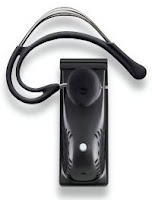
In the introduction of our in-depth Aliph JawBone bluetooth headset review, we established that the real-world wearability, durability and usability would be our primary areas of focus. This installment will review the overall wearability of the Aliph JawBone bluetooth headset.

Inside the box, the Aliph JawBone comes with four earloops and four earpads. After trying several combinations, we ended up using the Aliph JawBone as originally packaged. Once properly outfitted, we found the Aliph JawBone to be lightweight and comfortable to wear. When wearing the Aliph JawBone for extended periods of time, sometimes exceeding six hours, it remained comfortable and barely noticeable.

One draw back to the Aliph Jawbone design is the earloop. Although comfortable once looped onto the ear, the process of putting the Aliph JawBone on your ear is difficult to do with one hand. Considering that bluetooth headsets are most commonly used while driving, using one hand to put on the headset is important. However, after a day or two of practice, we were able to master it. The stock earpads do not allow using the Aliph JawBone without an earloop. Although the Aliph JawBone can be comfortably worn for extended periods of time using an earloop and stock earpad, using a molded eargel provides even greater comfort.

Molded eargels are an excellent alternative to the stock earpads and allow the Aliph JawBone to be used without an earloop. Depending on preference, custom mold eargels are available without much fuss or, for quite a bit less money, Jabra makes molded eargels in common sizes. Using a molded eargel provides enough stability that the JawBone stays secure in the ear, making an earloop no longer necessary (see picture.) A molded eargel also provides additional noise reduction and improved sound clarity, without feeling like your ear is stuffed with cotton. For added stability while jogging or performing some sort of vigorous activity, the Aliph JawBone can be used with an earloop and an eargel, which is even better than using the earloop and stock earpad.

Overall and out of the box, the wearability of the Aliph JawBone is on par with other bluetooth headsets on the market. Using a molded eargel makes the experience even better, but without a molded eargel the Aliph JawBone is lightweight and comfortable to wear. In the next part of the iPhoneWriter.com multi-part Aliph JawBone review, we will focus on durability; how well the Aliph JawBone holds up during real-world use.

Review: In-Depth Aliph JawBone and Apple iPhone Review, Introduction

After waiting a few weeks for the whir to die down, it was time to get a bluetooth headset, for our Apple iPhone. As it turns out, waiting was a good thing because in that time Apple added their own bluetooth solution to the long list of bluetooth headset options.

Being a huge fan of Apple's computers, since switching several years ago, it could only be a good thing that Apple decided to release their own bluetooth headset. Everything Apple makes is so well designed that an Apple bluetooth headset would have to set a new standard, much like the Apple iPhone has redefined the cellphone industry. Of course, before making a buying decision, practicality dictates reading as many reviews as possible (kind of like you're doing now.)

Spending nearly a week reading the good, the bad and the ugly of every forum post, blog and review of Apple iPhone bluetooth headsets we could find, the Apple bluetooth solution did not make the final list for potential purchase. Sad but true. While Apple's bluetooth solution is commonly reported to be sleek and appealing in design, the sound quality and lack of noise reduction are also common topics. Finally, the buying decision was narrowed to two units: the Jabra NX-10 and the Aliph JawBone. Based on numerous reports and reviews, the Aliph JawBone was finally chosen (the title of this review might have given you a clue.)

Over the next few articles (not necessarily in successive order), the iPhoneWriter.com web site will be posting an in-depth review of the Aliph JawBone bluetooth headset. As with other iPhoneWriter.com reviews, the multi-part Aliph JawBone review will focus on real-world usage scenarios dealing with wearability, durability and overall usability, in that order.

With that said, the next article in the series will focus on wearability, that is to say how the Aliph JawBone fits and feels when in action.

Aliphe JawBone Review, Part Two: Wearability >>

Apple iPhone and Ecamm iDrive

What a great combination my Apple iPhone and iDrive make. You might say that they make beautiful storage together, to turn a phrase. Developed by Ecamm Network, the same people that develop the award winning iGlasses software, iDrive brings portable storage capability to Apple iPhone owners.

I recently tried out iDrive with my own Apple iPhone and really liked it. The one shortcoming being that to transfer files from one computer to another, both computers must have iDrive installed. Since iDrive is an Apple only application, that of course means that both computers must be Apple's. However, this limitation aside, iDrive it does the trick until Apple builds releases the functionality into the iTunes/iPhone combination (likely by way of a future software update.)

Change Your Apple iPhone Ringtones with iFuntastic

I was let down when the Apple iPhone launched without support for custom ringtones. It was definitely a let down, to say the least. So, when the bitSplit team released the iFuntastic application, which greatly reduced the steps and effort to put custom ringtones on the Apple iPhone, I was excited to give it a try.

I originally tried version 1 of iFunstastic and, thankfully, it worked as advertised. By following the step-by-step instructions to the letter, I was able to successfully add my own ringtones to my Apple iPhone. Awesome! Finally, I can have my favorite Danger Island Ringtone alert me to new calls. Using the iFuntastic application is also free of reported side effects, so synching with iTunes, YouTube integration and Visual Voice Mail continued to work flawlessly.

Since using the first version, iFuntastic version 2.x has been released. The new version of the program has a much nicer interface and makes it even easier to manage the ringtones on your Apple iPhone. Plus, the new version of iFuntastic supports rearranging the icons on the Home Screen and changing the default AT&T logo. Sweet! This program just keeps getting better and better.

Right now the iFuntastic application is for Intel based Mac's only and can be downloaded from here or here.

Review: Tom Bihn Organizer Pouch

As mentioned in a previous review of the Tom Bihn Buzz sling backpack bag, I also purchased the small Tom Bihn organizer pouch. At the time, I elected to hold off on reviewing the organizer pouch and focus on reviewing the Buzz by itself. Well, the time has come to review the Tom Bihn Organizer Pouches.

Measuring about 7" by 5", the small organizer pouch is a great size for carrying a collection of small items. For me, this means my portable USB hub, a couple of thumb-drives and a few other geek essentials. For others, for instance someone with a lot of jewelry, it's a great size for your watch, bracelets and rings (read on about the padded pouch, which is even better for precious cargo like an Apple iPhone.)

Slightly larger in size, measuring in at 10.3" by 7", the medium organizer pouch is perfect for carrying items that are otherwise too big for the small organizer pouch. For instance, I use my medium organizer pouch for various power cords, adapters and cables.

New additions to the organizer pouch family include the padded and clear-sided pouches. The small padded organizer pouch is ideally suited for smaller items that are breakable or require some extra protection. The inside is even lined with soft brushed nylon, for added protection. The Buzz has a built-in padded pocket on the strap that is perfect for a portable music layer or cell phone (like my precious Apple iPhone) but the pocket won't hold your music player and your cell phone (of course, if your using an Apple iPhone than you don't need two devices anymore!) The small padded organizer pouch becomes the perfect addition to hold the extra item. I have my padded organizer pouch clipped to the zipper pull, on the outside of my Buzz backpack sling.

The clear plastic side of the clear-sided organizer pouch makes it perfect for that jumbled collection of items that having visibility deep into the bag (like pencils or pens or paperclips or your favorite baseball cards) or anytime you want to know what's in the bag.

All of the Tom Bihn organizer pouches are manufactured in Seattle and are made of durable Cordura®, which is more durable than nylon, polyester or cotton. The stitching is first rate, with every stitch perfectly in line. As with the Buzz backpack sling, every inch of the organizer pouches screams quality and durability.

When combined with a backpack, the organizer pouches are the ideal solution for for carrying the extra items you don't always need. This is what makes the organizer pouches so effective, their modular ability. Arm yourself with more than one organizer pouch and suddenly, you have the ability to mix and match the accessories and gadgets you are able to carry. Some times, I don't need all of the cords and adapters that I carry in my medium organizer pouch, so on those days I remove it from the mix. Other days, I need everything I can carry, so multiple organizer pouches and my Tom Bihn Buzz combine to suit the need, perfectly.

The convenience of the clips cannot be overstated. Said another way, the clips are the key. Every organizer pouch has one, and they are the single coolest feature (and my favorite.) Made of heavy duty plastic, the clips provide the ability to attach the organizer pouch to just about anything with a loop or hook.

Another job well done, Tom. You too, Riley.